A new phishing scam is targeting X (Twitter) users with fake security alerts that look almost identical to the real thing.
You open your inbox and see an urgent email from X, formerly Twitter.
“We noticed a login to your account from a new device. Was this you?”
You are panicked. The message says someone logged in from another city or even another country. It tells you to change your password immediately and review the apps connected to your account.
Everything looks genuine. The logo is right. The wording sounds professional. The advice even seems helpful.
But one click could hand your account over to scammers.
A new phishing campaign is targeting X users with fake security alerts that look almost identical to the real thing. The goal is simple: scare you into clicking a malicious link that steals your login details or tricks you into giving scammers access to your account.
How does this scam work?
This attack relies on fear and urgency.
The scam begins with an email claiming there has been a suspicious login to your X (Twitter) account. It usually says someone accessed your account using a new device from an unfamiliar location.
The email then asks you to act immediately by clicking links to:
- Change your password
- Review apps connected to your account
- Secure your account
These are all things X (Twitter) actually recommends after suspicious activity. That is what makes the scam so convincing.
The problem is not the advice. The problem is the links.
Instead of taking you to X (Twitter), they lead to fake websites that look almost identical to the real login page. If you enter your username and password, the scammers receive them instantly. In some cases, the fake page also asks you to authorize a malicious app, giving attackers ongoing access to your account.
Why do scammers want your X account?
Many people think, “There is nothing important on my X (Twitter) account.”
Scammers disagree.
A compromised social media account can be used to:
- Spread cryptocurrency scams
- Send phishing messages to your followers
- Promote fake investment schemes
- Scam your friends using trusted conversations
- Sell stolen accounts on underground marketplaces
Accounts with many followers or verified status are especially valuable because people are more likely to trust posts from them.
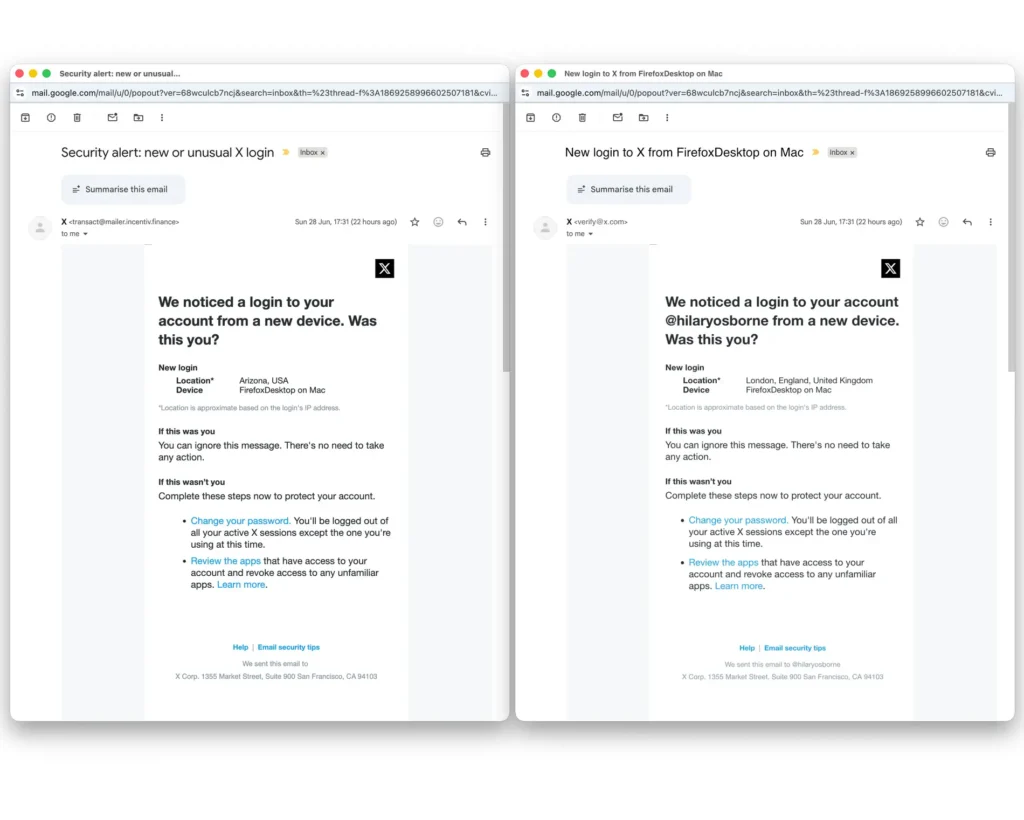
A recent investigation by The Guardian described phishing emails sent to X (Twitter) users claiming there had been a login from a new device, often listing locations such as Arizona to make the alert appear alarming.
The emails copied the appearance and wording of genuine security notifications almost perfectly. They even included legitimate security advice. The only difference was that the links pointed to phishing websites instead of X (Twitter).
Cybersecurity experts warned that many users could easily mistake these messages for genuine alerts.
Why these emails are so convincing
Modern phishing emails are no longer filled with spelling mistakes and poor grammar.
Today’s scammers often:
- Copy official logos and branding
- Use professional language
- Match the design of genuine emails
- Include real security advice
- Create fake websites that closely resemble official ones
Sometimes the only visible warning is the sender’s email address or the destination of the link.
What should you do instead?
If you receive a suspicious login alert:
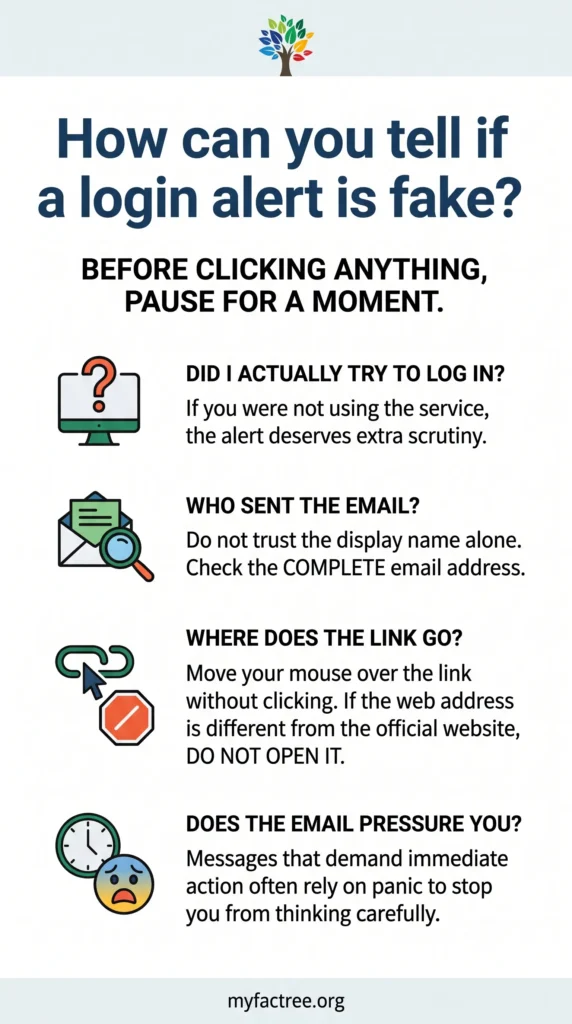
- Do not click any links in the email.
- Open the official X app or type the official website address into your browser yourself.
- Check your account activity from there.
- If you are concerned, change your password from the official website.
- Review connected apps directly within your account settings.
- Turn on two-factor authentication if you have not already.
This trick is not limited to X (Twitter)
The same tactic is used against users of many online services.
The names change, but the goal stays the same: get you to click first and think later.
Scammers know that fear makes people act quickly.
A message saying someone has logged into your account can create panic within seconds. That is exactly what attackers want.
The safest response is simple.
Do not click the link.
Open the official app or website yourself, check your account, and take action only from there.
One extra minute of verification can save your account from being stolen